
3D Paper Material turns Tally into paper on a wall: a dark, warmly lit hero with a torn washi budget sheet, cotton-rag feature slips held by washi tape, kraft envelopes and vermilion stamps. The dashboard is a paper desk with ledger-paper charts. The craft feel is real, but it is drawn with CSS and SVG rather than 3D, and both mobile pages scroll sideways. Pick it for warm, handmade brands.
3D Paper Material vs 3D Sky Rays
Meng To · Meng To
Tied at 3/5 on the same brief. Pick by fit: the rows below show where each one is stronger.
Both built the Tally landing page in the same Claude Code test, and both design the Print Romantic way: cream paper, serif headlines, nothing shouting. Both are best for: visual direction.
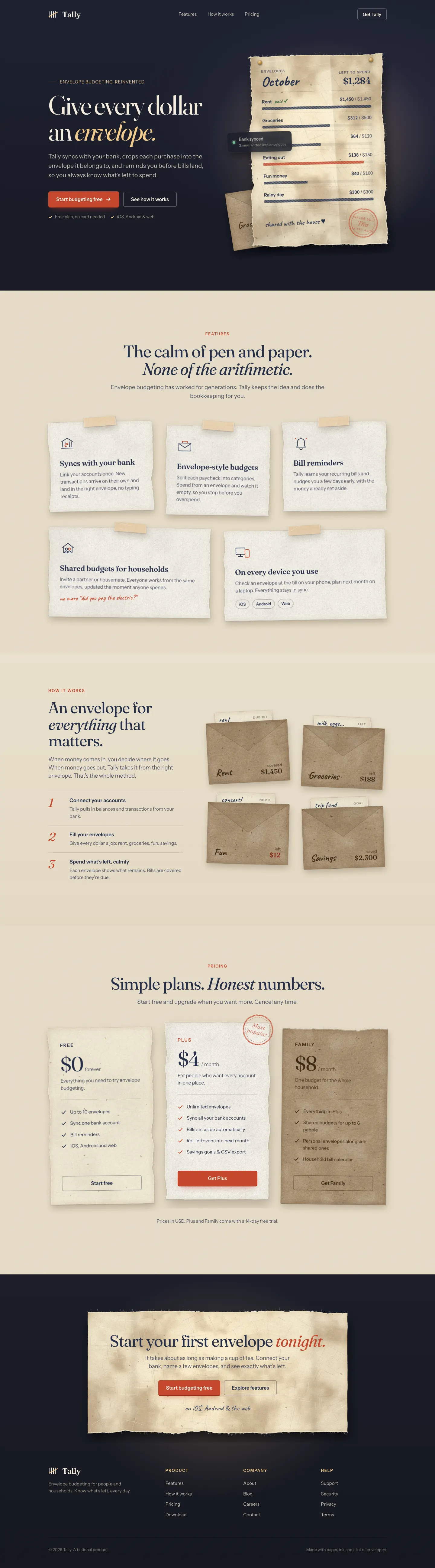



First screen only. Switch to side by side to read the full pages.
Scroll either page; the other follows.
3D Sky Rays gives Tally a golden-hour hero: a live WebGL scene with sunlight through a tree canopy over a rooftop and hills, then a cream and dusk page with Fraunces and Manrope. The dashboard puts the October summary in a sunlit banner with rays through leaves. The hero is lovely, though the rest of each page is a warm cream look close to the default. Pick it for a calm, cinematic hero.
Side by side
| Field | 3D Paper Material (Meng To) | 3D Sky Rays (Meng To) |
|---|---|---|
| Fonts |
|
|
| Colors |
|
|
| Pick it for |
|
|
| Skip it for |
|
|
| Observations |
|
|
Install 3D Paper Material (Meng To)
1 Run in your terminal
npx degit MengTo/Skills/agent-skills/3d/3d-paper-material#main .claude/skills/3d-paper-material2 Or paste a prompt into Claude Code, Codex, Cursor or Gemini
It tells your tool to install this from its source repository.
This install is for Claude Code only; for other agents use Copy prompt or copy the skill folder.
Copies just this skill's folder into your project's .claude/skills.
Check the source for the latest instructions.
Install 3D Sky Rays (Meng To)
1 Run in your terminal
npx degit MengTo/Skills/agent-skills/3d/3d-sky-rays#main .claude/skills/3d-sky-rays2 Or paste a prompt into Claude Code, Codex, Cursor or Gemini
It tells your tool to install this from its source repository.
This install is for Claude Code only; for other agents use Copy prompt or copy the skill folder.
Copies just this skill's folder into your project's .claude/skills.
Check the source for the latest instructions.