
Vintage builds Tally as a Windows 95 desktop: a grainy teal background, beveled silver windows, Silkscreen pixel headings and JetBrains Mono text. Features, pricing and the FAQ each sit in their own window, and the dashboard adds a title bar, LCD-style readouts and segmented progress bars. It is the most fully committed theme in this batch, and it still works on a phone. Pick it for retro, playful or nostalgic brands.
Vintage vs Framed Tech Dark Border Gradient
Awesome Design Skills · Meng To
Vintage (Awesome Design Skills) scored higher on the same brief, 4/5. The rows below show where each one fits.
Both built the Tally landing page in the same Claude Code test, and both design the Engineer way: monospace, grids and labels. If it isn’t aligned, it isn’t done. Both are best for: visual direction.
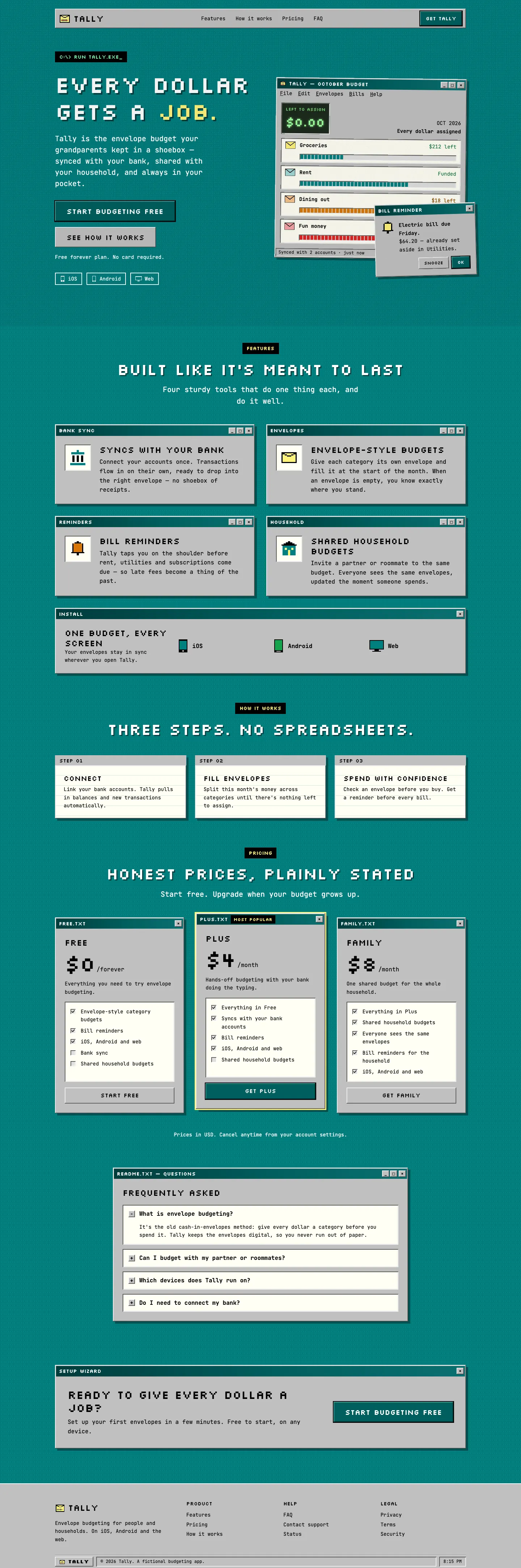
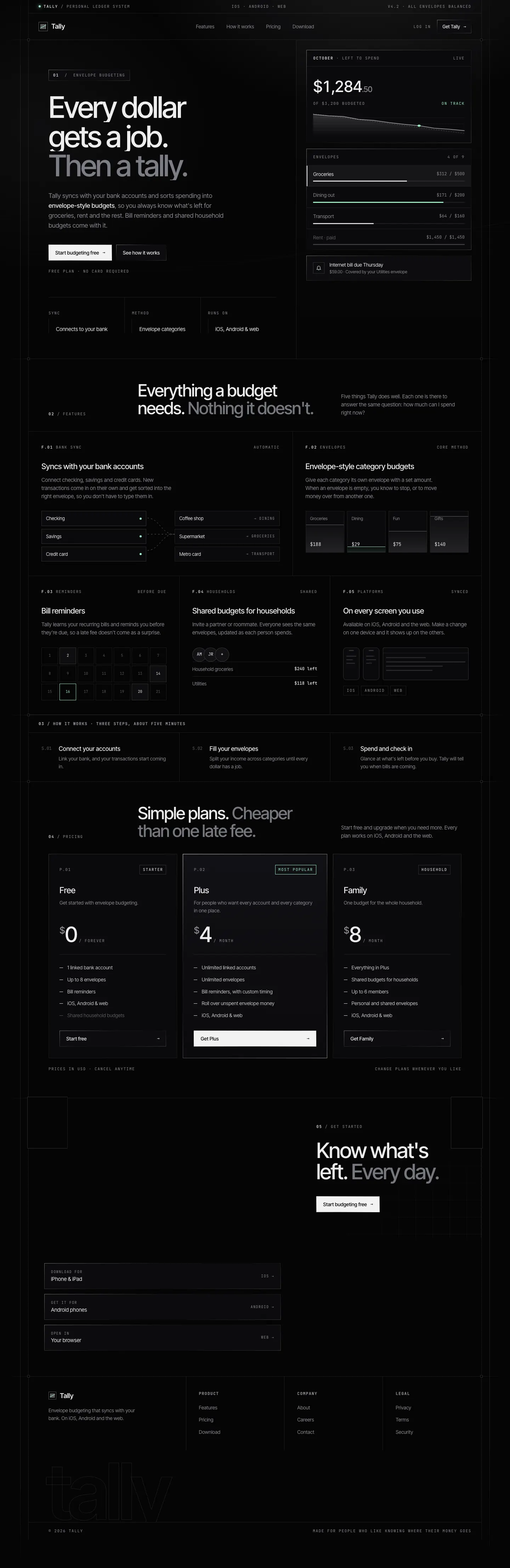


First screen only. Switch to side by side to read the full pages.
Scroll either page; the other follows.
Framed Tech gives Tally a near-black page inside one framed shell: thin edge rails, corner markers, 1px gradient borders and uppercase mono labels, with a sparse mint accent. The dashboard uses the same framed shell, mint for money left and coral for overspending. It is clean and precise, but both mobile pages scroll sideways. Note that the landing and dashboard come from two different test days. Pick it for developer and infra products.
Side by side
| Field | Vintage (Awesome Design Skills) | Framed Tech Dark Border Gradient (Meng To) |
|---|---|---|
| Fonts |
|
|
| Colors |
|
|
| Pick it for |
|
|
| Skip it for |
|
|
| Observations |
|
|
Install Vintage (Awesome Design Skills)
1 Run in your terminal
npx degit bergside/awesome-design-skills/skills/vintage#main .claude/skills/vintage2 Or paste a prompt into Claude Code, Codex, Cursor or Gemini
It tells your tool to install this from its source repository.
This install is for Claude Code only; for other agents use Copy prompt or copy the skill folder.
Copies just this skill's folder into your project's .claude/skills.
Check the source for the latest instructions.
Install Framed Tech Dark Border Gradient (Meng To)
1 Run in your terminal
npx degit MengTo/Skills/agent-skills/web-design/framed-tech-dark-border-gradient#main .claude/skills/framed-tech-dark-border-gradient2 Or paste a prompt into Claude Code, Codex, Cursor or Gemini
It tells your tool to install this from its source repository.
This install is for Claude Code only; for other agents use Copy prompt or copy the skill folder.
Copies just this skill's folder into your project's .claude/skills.
Check the source for the latest instructions.