
Dark Blue Contrasting Clean gives Tally a deep navy page with bright cobalt gradient blocks, crisp frames, Inter and lots of JetBrains Mono labels. The dashboard leads with a cobalt summary card and stays clear and readable. Pick it for confident, technical-feeling products.
Dark Blue Contrasting Clean vs Dark Glass Clean Layout
Meng To · Meng To
Tied at 3/5 on the same brief. Pick by fit: the rows below show where each one is stronger.
Both built the Tally landing page in the same Claude Code test, and both design the Night Shift way: dark screens, glowing accents, work that looks best at 2am. Both are best for: visual direction, dashboards.
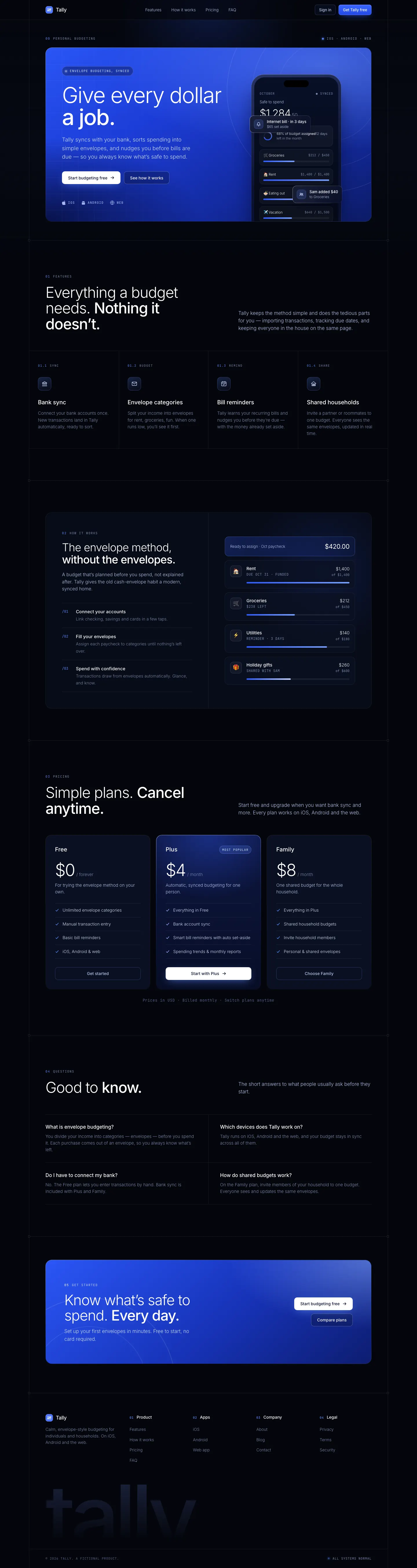
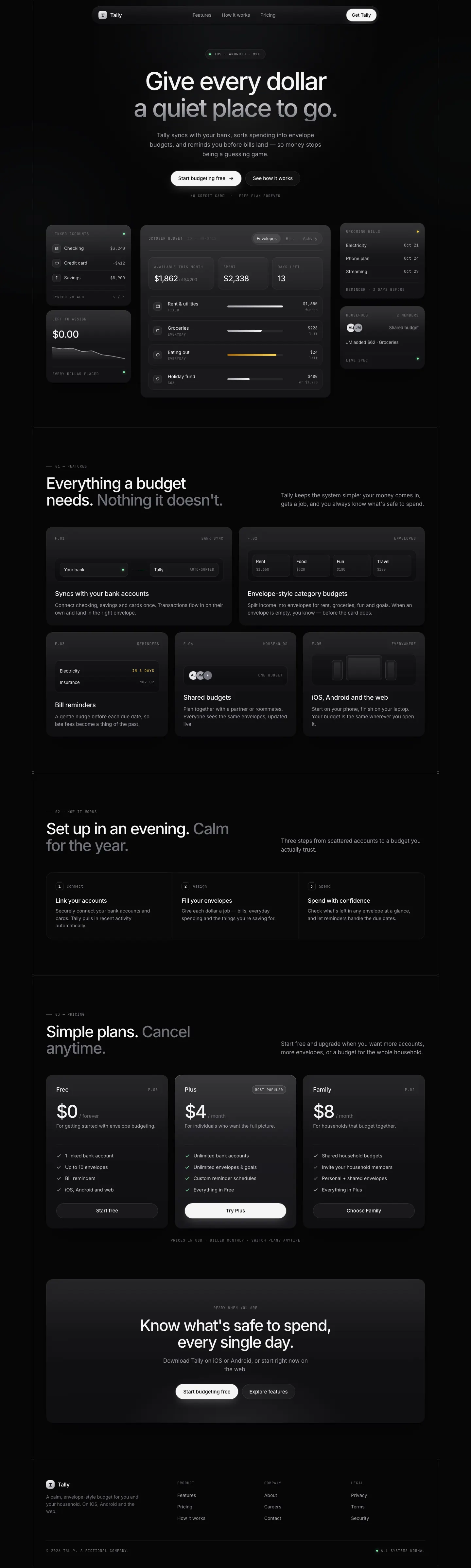


First screen only. Switch to side by side to read the full pages.
Scroll either page; the other follows.
Dark Glass Clean Layout is the neutral version of dark mode: near-black zinc surfaces, frosted cards, Inter with mono labels and almost no color beyond a pale green. It looks expensive and quiet, but both pages scroll sideways on a phone. Pick it for premium, understated products.
Side by side
| Field | Dark Blue Contrasting Clean (Meng To) | Dark Glass Clean Layout (Meng To) |
|---|---|---|
| Fonts |
|
|
| Colors |
|
|
| Pick it for |
|
|
| Skip it for |
|
|
| Observations |
|
|
Install Dark Blue Contrasting Clean (Meng To)
1 Run in your terminal
npx degit MengTo/Skills/agent-skills/web-design/dark-blue-contrasting-clean#main .claude/skills/dark-blue-contrasting-clean2 Or paste a prompt into Claude Code, Codex, Cursor or Gemini
It tells your tool to install this from its source repository.
This install is for Claude Code only; for other agents use Copy prompt or copy the skill folder.
Copies just this skill's folder into your project's .claude/skills.
Check the source for the latest instructions.
Install Dark Glass Clean Layout (Meng To)
1 Run in your terminal
npx degit MengTo/Skills/agent-skills/web-design/dark-glass-clean-layout#main .claude/skills/dark-glass-clean-layout2 Or paste a prompt into Claude Code, Codex, Cursor or Gemini
It tells your tool to install this from its source repository.
This install is for Claude Code only; for other agents use Copy prompt or copy the skill folder.
Copies just this skill's folder into your project's .claude/skills.
Check the source for the latest instructions.