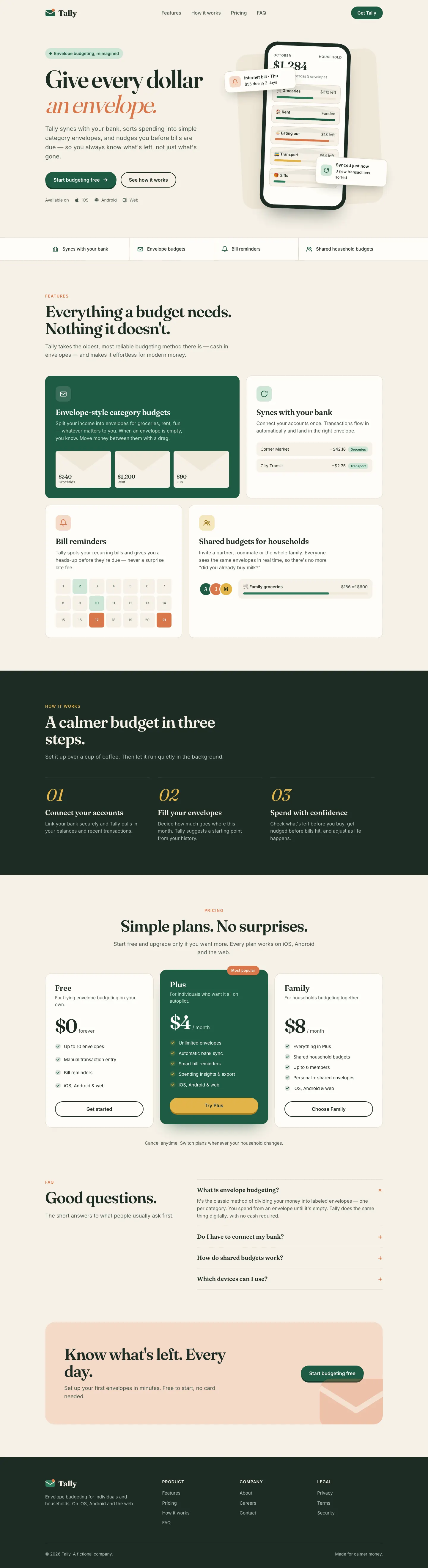
This system prompt moves Tally to a cool grey-and-ink look with Bricolage Grotesque, Geist and a lime marker, and the dashboard is clean and well organized. One contrast bug on the closing CTA keeps it from a higher score.
 Skills for Design
 claude-design-system-prompt scored higher on the same brief, 4/5. The rows below show where each one fits.
Both built the Tally landing page in the same Claude Code test. Shared tasks: Design systems, Visual direction.
This system prompt moves Tally to a cool grey-and-ink look with Bricolage Grotesque, Geist and a lime marker, and the dashboard is clean and well organized. One contrast bug on the closing CTA keeps it from a higher score.

3/5
StyleSeed gives Tally a warm blush canvas, Plus Jakarta Sans and a deep green primary, with a full token set behind it. It's clean, with slight distance from the baseline, and the dashboard in Manrope matches. It was the longest run in the batch. Pick it if you want a design-system workflow more than a bold look.
| Field | claude-design-system-prompt | styleseed |
|---|---|---|
| Fonts |
|
|
| Colors |
|
|
| Good fit for |
|
|
| Not great for |
|
|
| Flaws we saw |
|
|
The baseline with no skillHow the brief works
1 Paste a prompt into Claude Code, Codex, Cursor or Gemini
It tells your tool to install this from its source repository.
No install command in README: paste system-prompt.md as the system prompt and copy skills/ manually.
Taken from the project README. Check the source for the latest instructions.
1 Run in your terminal
claude plugin marketplace add bitjaru/styleseed
claude plugin install styleseed@styleseed2 Or paste a prompt into Claude Code, Codex, Cursor or Gemini
It tells your tool to install this from its source repository.
Plugin install is Claude Code only; for other agents use Copy prompt or copy the skill folder.
Taken from the project README. Check the source for the latest instructions.